
Victron Nucleo GX – Perfect monitoring & control
for 12V / 24V / 48V systems | up to 25 VE.Direct devices | 2x VE.Direct | 2x VE.Can | Ethernet & Wi-Fi | 3x USB A | MicroSD slot
With the Nucleo GX, Victron Energy is expanding its portfolio of GX control and communication centres with another high-performance model. Complementing the Cerbo GX MK2 and Ekrano GX, this compact GX unit is particularly suited to ESS and off-grid installations based on the Multi RS. Of course, the Nucleo GX is not limited to use with the Multi RS, but is equally suitable for numerous other Victron Energy systems and applications, whether in a caravan, expedition vehicle or boat.
Thanks to its focused range of functions, the Nucleo GX offers the high computing power of the Ekrano GX at an attractive price, making it a powerful and cost-effective solution for modern energy systems. The integrated quad-core processor enables communication with up to 25 VE.Direct devices via VE.Direct, as well as with other components via USB and VE.Can. At the same time, the Nucleo GX handles the central monitoring and control of the entire system. This allows, amongst other things , real-time monitoring of battery status, energy consumption and the energy supply from photovoltaic systems, generators or the mains grid. Furthermore, the device supports automatic generator start/stop functionsand the display of warning messages.
If required, the range of functions can be expanded using optional USB accessories such as, for example, the MK3 USB-C interface adapter, the GX IO-Extender 150 or the GX Tank 140. Configuration and monitoring are conveniently carried out via the Remote Console in the VRM portal, the VictronConnect app or a web browser. An Android GX Wi-Fi display can also be connected for local display and operation.
Features:
- For 12V / 24V / 48V systems
- 2x VE.Direct ports (always isolated) | up to 25 VE.Direct devices
- 2x VE.Can (1x isolated)
- Ethernet & Wi-Fi
- Bluetooth Smart
- 3x USB Type-A
- MicroSD slot
- LEDs
- Network reset button
- Audible alarm
- IP20
- Various access methods
- Flexible mounting options
Note: If you already have a VE.Bus device in your system, such as a MultiPlus or Quattro, or are planning to set up such a system, we recommend that you opt for the Cerbo GX MK2 or the Ekrano GX. Both devices feature an integrated VE.Bus interface, which ensures optimal integration and a full range of functions.
We’d be happy to assist you with advice and help you choose the right device for your application. Just get in touch – we look forward to hearing from you.
Bluetooth Smart on the Nucleo GX
The Nucleo GX’s Bluetooth Smart function assists you with the initial set-up and network configuration of the device. Using the VictronConnect app, you can connect to the Nucleo GX via Bluetooth and conveniently configure key settings.
The following functions, amongst others, are available via the VictronConnect home screen:
- Changing network and Ethernet settings
- Enabling or disabling the built-in Wi-Fi access point
- Accessing your system via Victron Remote Management (VRM)
Please note that the Bluetooth Smart function is not intended for connecting to other Victron products via Bluetooth. A direct connection to devices such as SmartSolar charge controllers is therefore not possible.
How do I monitor, control and configure the Nucleo GX locally and remotely?
Using the free Victron VRM Portal website and the free VRM app, you can monitor and control your devices connected to the Nucleo GX, as well as one or more systems, either locally (via LAN) or remotely via the internet from anywhere in the world. You can access the system conveniently via a smartphone, tablet, laptop or PC running a wide variety of operating systems. The options range from adjusting settings to automatically starting a backup generator, and much more.
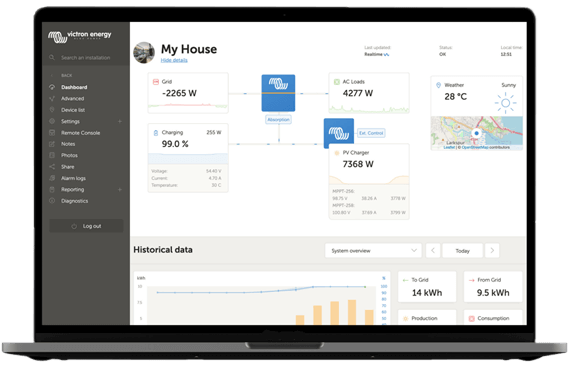
VRM – Victron Remote Monitoring
Monitor all energy systems, tanks and temperatures remotely. Control your systems with ease, delve deep into the data to maximise performance, and identify problems early with push notifications.
With Victron’s free remote monitoring website (VRM), you can view all your system’s data in a comprehensive graphical format. The portal allows you to make system changes remotely and receive alerts via email.
Further information can be found in the manual, which is available in the downloads section.
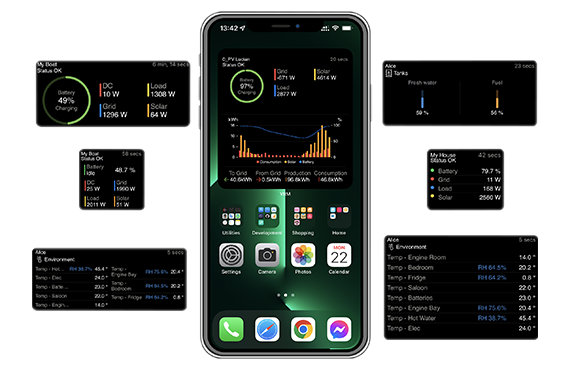
VRM app widgets
With the VRM app (available for iOS and Android devices on the App Store and Google Play), you can monitor, control and manage your Victron Energy system from virtually anywhere in the world. Even if you use multiple systems, you can manage them via the app.
Thanks to the VRM widgets, you can see all key system, tank and temperature data at a glance, without having to open the app first. Control your generator, energy storage system or electric vehicle charger directly from your smartphone’s home screen.
What are VRM app widgets?
Widgets are generally shortcuts that you can add to your home screen to access information quickly. Widgets are not only displayed on your home screen but can also be viewed in the Today view by swiping right from the home screen or lock screen. Please note that the VRM app’s widgets are not the same as those on the VRM portal. These are non-customisable phone widgets.
For further information, please refer to the manual available in the downloads section.
Android GX Wi-Fi Display for the Nucleo GX
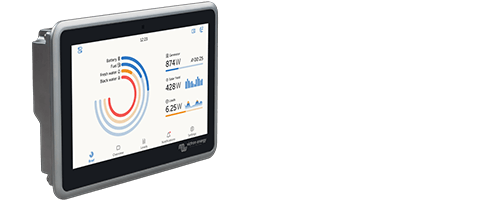
Even though the Nucleo GX does not have an HDMI port, you can turn an Android tablet or smartphone into a convenient display for your GX device. In kiosk mode, the Android device acts as a dedicated remote display and connects to your GX system via Wi-Fi.
This solution is ideal for GX devices without an integrated display, such as the Cerbo GX MK2 or the Nucleo GX. At the same time, the Android device can also be used as an additional display in combinationwith, for example, a GX Touch 50 or the integrated display of an Ekrano GX. Furthermore, several Android devices can be connected to a single GX device at the same time.
Simply continue to use an existing Android smartphone or tablet instead of purchasing a separate display device. In kiosk mode, the Android device is used exclusively for displaying and operating the GX system. Other functions of the device are hidden, ensuring a clear, secure and reliable user interface.
Note: An internet connection is required for the initial installation of the software. Afterwards, the Android device can be connected either via your local Wi-Fi network or directly via the GX device’s built-in Wi-Fi access point. A permanent internet connection is not required for operation.
Nucleo GX – Seamless system visualisation on Garmin and Navico chartplotters (MFDs)
Use the screen of your marine display as the central display for your Nucleo GX’s energy data. The system offers suitable integration options for Garmin and Navico chartplotters.
- Navico MFD integration:
Navico multifunction displays can be connected to the Nucleo GX via both Ethernet and NMEA 2000. Via Ethernet, the Victron-GX interface can be displayed directly on the chartplotter. Alternatively, the GX system can be integrated into the existing on-board network via NMEA 2000. In this case, the supported system data – such as battery and energy information – is displayed directly on the compatible Navico MFD. No change to the device instance is required for this. - Garmin MFD integration:
Simply connect the Nucleo GX to a compatible Garmin multifunction display using an Ethernet cable. Thanks to built-in Garmin OneHelm™ support, data from the GX system is displayed directly on the chartplotter and seamlessly integrated into the user interface. When used with a compatible Garmin MFD, Garmin ActiveCaptain can also be utilised. An Ethernet connection between the Garmin MFD and the GX unit is required for these functions.
What is the difference between isolated and non-isolated CAN bus interfaces?
1. Isolated CAN bus interface:
Electrical isolation: With isolated interfaces, there is galvanic isolation between the CAN bus and the connected devices. This means that there is no direct electrical connection between the two sides.
Protection against interference: The isolation protects against interference, overvoltages and ground loops that can arise from differing ground potentials. This is particularly important in industrial applications or in environments with high levels of electromagnetic noise.
Applications: Isolated interfaces are frequently used in safety-critical applications where high reliability and protection against electrical interference are required.
2. Non-isolated CAN bus interface:
No electrical isolation: With non-isolated interfaces, there is no galvanic isolation. The devices are connected directly to one another, which means that interference or overvoltages can be transmitted from one device to another.
Cost-effectiveness: Non-isolated interfaces are generally more cost-effective and easier to implement, as they require fewer components.
Applications: This type of interface is frequently used in less critical applications where environmental conditions are stable and there are no high requirements for electrical isolation.
Conclusion
The choice between an isolated and a non-isolated CAN bus interface depends on the specific requirements of your application. When used in an environment with potential interference or differing earth potentials, an isolated interface is advisable. In stable environments with lower requirements, a non-isolated interface may be sufficient.
Comparison of three control and communication hubs
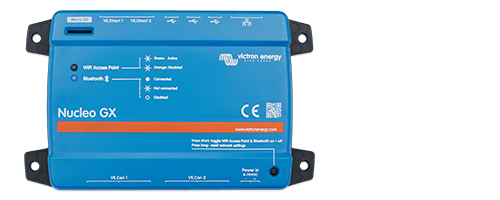
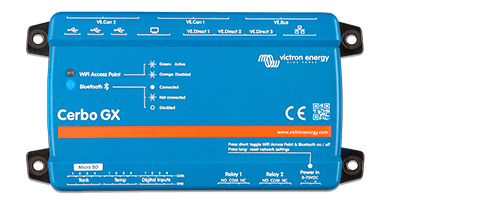
IP31 (when mounted with springs)
Rear: IP21
* The maximum value listed in the table above is the sum of the connected VE.Direct devices, such as MPPT solar charge controllers. ‘Total’ refers to all directly connected devices plus those connected via USB. The limit is primarily determined by the CPU processing power.
** The Bluetooth function is designed to assist with the initial connection and network configuration. You cannot establish a Bluetooth connection with other Victron products (e.g. SmartSolar charge controllers).
Note: Further technical specifications for the devices listed in this comparison can be found on the respective product detail page, under the ‘Technical Specifications’ tab or under the ‘Download’ tab in the relevant user manual.
What if I don’t have enough connections or my system expands later on?
No problem – are the existing connections on your Nucleo GX not enough, or has your system grown over time and the original connections no longer meet your new requirements? With the GX IO-Extender 150 or GX Tank 140 expansion modules, you can expand your GX system flexibly and in line with your needs. Both devices expand the functionality of your Nucleo GX and create additional options for monitoring, controlling and automating your system – without having to replace your existing system and tailored precisely to your individual requirements.
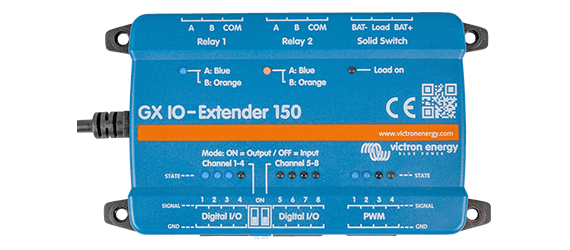
GX IO Extender 150
The GX IO Extender 150 is a USB-connected expansion module that expands the available I/O ports (inputs/outputs) of your Nucleo GX, thereby enabling the seamless integration of additional sensors, controllers and external devices. This gives you endless possibilities for monitoring, control and automation. It is a simple and efficient expansion solution that uses the USB connection as its power source. If you wish to increase the number of connections, you can add multiple GX IO Extender 150 units.
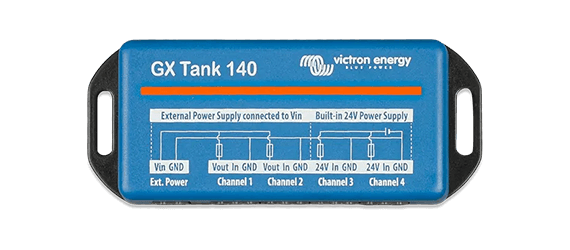
GX Tank 140
The GX Tank 140 enables you to record readings from up to four tank level sensors, adding convenient tank monitoring to your Nucleo GX; it is also connected via USB. The recorded tank levels are clearly displayed directly on the connected GX device and can be viewed locally at any time. In addition, all measured values can be conveniently monitored remotely via the Victron Remote Management (VRM) portal. This allows you to keep an eye on the levels of your water, fuel or waste water tanks at all times – regardless of where your system is located.
Further specific information can be found on the relevant product page or in the download section there. Of course, we are also happy to answer your questions in person, whether by telephone, email or at our premises.
Contents of the package
- Victron Nucleo GX | BPP900453100 | high-performance communication hub
- 1x power connection cable
- 2x terminating resistors
- You will, of course, also find a user manual and a data sheet in German in our download section.
You can find further helpful tips on our FAQ page via the link below: FAQ.


